Domains & sites
How to put your public site on a real domain you own, including buying a new domain straight from your workspace.
Agent A workspaces ship with one public-site URL out of the box (the <workspace>.ahrefs.letaido.app autogen pattern).
When you are ready to put a site behind a real domain, you have two paths: bring a domain you already own, or buy a new one from inside the workspace.
Bring a domain you already own
If your team already owns example.com somewhere (Cloudflare, GoDaddy, Squarespace, your registrar of choice):
- Attach it to a public site from the Sites tab. The workspace prepares the DNS record (A or CNAME) and the TLS cert.
- Add the DNS record at your existing registrar. The Sites tab shows you the exact record to paste.
- Wait for propagation. Usually 5 to 30 minutes. The site is live the moment DNS resolves and the cert issues.
If your registrar supports the Cloudflare or DNSimple connectors and you grant write access, the agent can create the DNS record for you instead of pasting it manually.
Buy a new domain from inside the workspace
Newer workflow: search, pay, attach. No leaving Agent A.
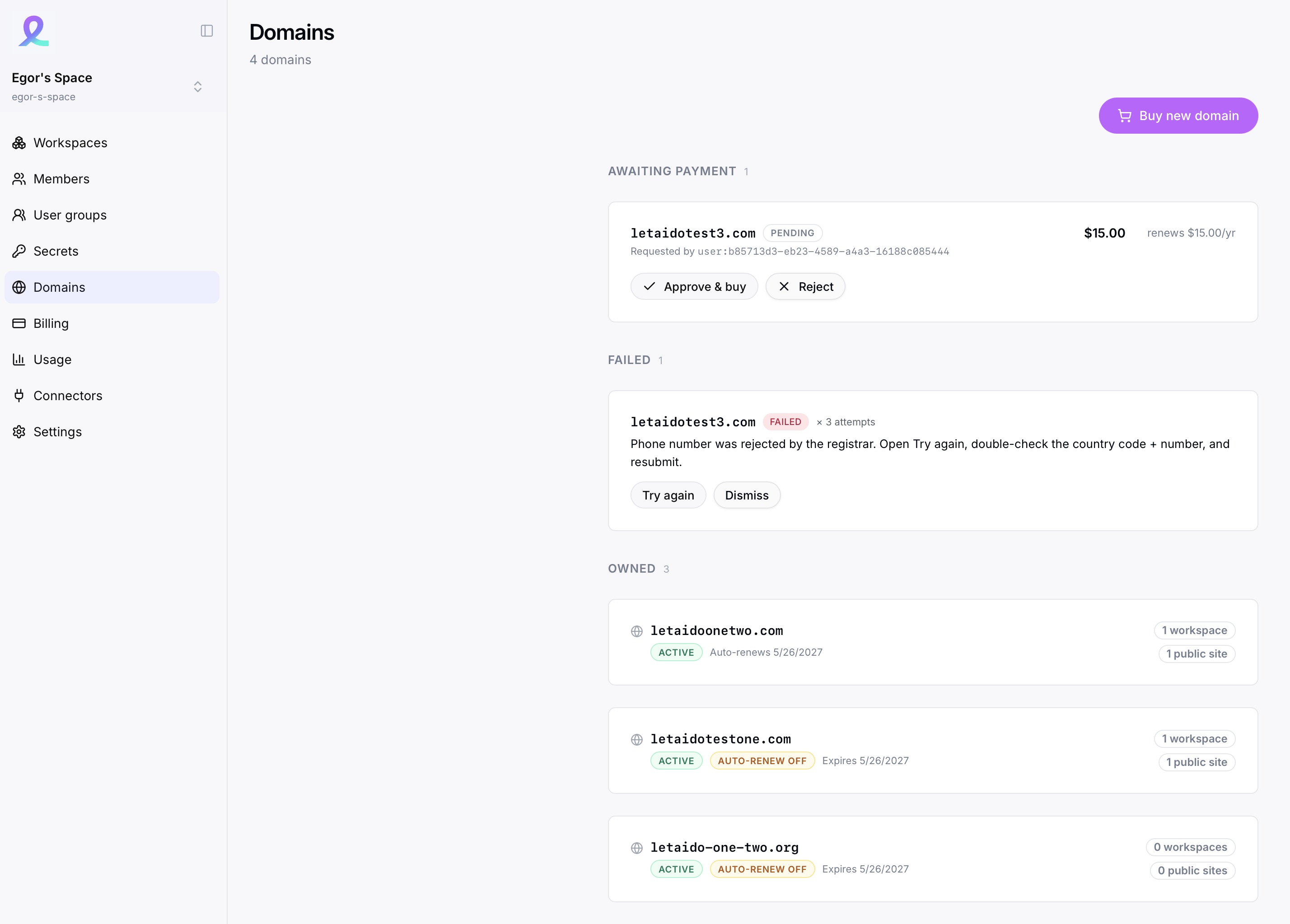
- Search for the domain. Open the Sites tab and type the name you want. The workspace queries Route 53 and shows availability and price.
- Buy it. Admin clicks pay; checkout runs through Stripe. The domain is registered to your org and granted to this workspace.
- Attach it to a public site. The DNS zone is already inside the platform, so the A or CNAME record and the TLS cert are wired automatically. No record-paste step. Site is live in a minute or two.
Constraints worth knowing
- Only new (unregistered) domains are supported right now. If
yourbrand.comis already taken at another registrar, you cannot buy it inside the workspace; bring it in via the attach-an-existing-domain flow instead. - Some TLDs need support to enable. The platform proxies the request to the underlying registrar; if a TLD isn't on its list, the error tells you to contact support and we enable it manually.
- Admin pays. Only workspace admins or owners can complete the checkout. Members and viewers cannot buy domains.
- Renewal is handled by a Stripe subscription. Agent A doesn't auto-renew the domain at the registrar directly; instead, your Stripe payment triggers renewal each year. If the subscription lapses, the domain enters its standard registrar grace period.
- No Agent A markup on the domain price. You pay the registrar's price; the platform doesn't charge an extra fee for the buying flow itself.
Registrant information
You provide three contacts on a new domain: registrant, admin, and tech. By default admin and tech are copies of the registrant ("billing address same as shipping" style), and you can edit any of them.
The platform doesn't store your contact details. It fetches them from the registrar on demand and pushes updates when you change them. For domains you're in the middle of buying, your contact info is held temporarily so you can fill in the next one faster.
Granting domains to workspaces
A domain bought (or attached) at the org level can be granted to any workspace in your org. Granting is what makes the domain selectable in that workspace's Sites tab.
- One domain can be granted to one workspace at a time. To move it, revoke the grant from workspace A, then grant to workspace B.
- Apex domains (
example.com) and subdomains (docs.example.com) are both supported. - A single domain can host multiple subdomains on the same workspace if you have multiple public sites.
Detaching and revoking
Admins can detach a domain from a public site at any time (Sites tab → the domain → Detach). Detaching only updates the platform's site config; DNS records and the registration itself stay where they are.
To fully remove a domain from a workspace, revoke its grant at the org level after detaching.
What's coming
A few things are queued up and not yet in this build:
- Agent-driven flows ("buy me example.com and attach to my docs site") will land in the next release. Today the buying flow is UI-only.
- Domain transfers in (move an existing domain registration into the platform) are in progress.
- Registrant email confirmation is live; resend, Cloudflare proxy support, saved registrant contacts, dashboard rollups, and static IPs for apex domains are scheduled.
Common questions
What if my domain renewal fails? Stripe retries the payment per its normal dunning rules. If all retries fail, the platform notifies you and the domain enters the registrar's standard grace period (60-90 days for most TLDs). You can re-pay during grace; after that the domain is released.
Can I use a domain I bought at GoDaddy and just point DNS at the workspace? Yes, that's the "Bring a domain you already own" path above. You keep ownership at GoDaddy; only DNS routes to Agent A.
Can I buy a domain and not use it yet? Yes. A bought domain stays in your org until you grant it to a workspace and attach it to a site. Renewal continues regardless.
Is the cost of the domain pulled from my AI credit balance? No. Domain charges run through a separate Stripe subscription with their own billing line. AI credits are only spent on model calls and connector calls.